KPImailer for Power BI
Power BI reports, in every inbox, for everyone.
Drag Power BI visuals into an email, write text with live measure values, burst per region and schedule it in any time zone. Recipients need no Power BI licence and no login.
Current version 1.10.1 · What is new

- 01
No licence for recipients
Recipients get a finished email and files. No Power BI account, no login, no workspace access.
- 02
Each person, their own data
Burst on a column with a live count first, and route each copy with a recipient column.
- 03
Pro or Premium
Uses native Export to file on Premium, Fabric or Embedded capacity, and its own high-fidelity render on Pro or shared capacity.
Capabilities
What KPImailer for Power BI does.
Design
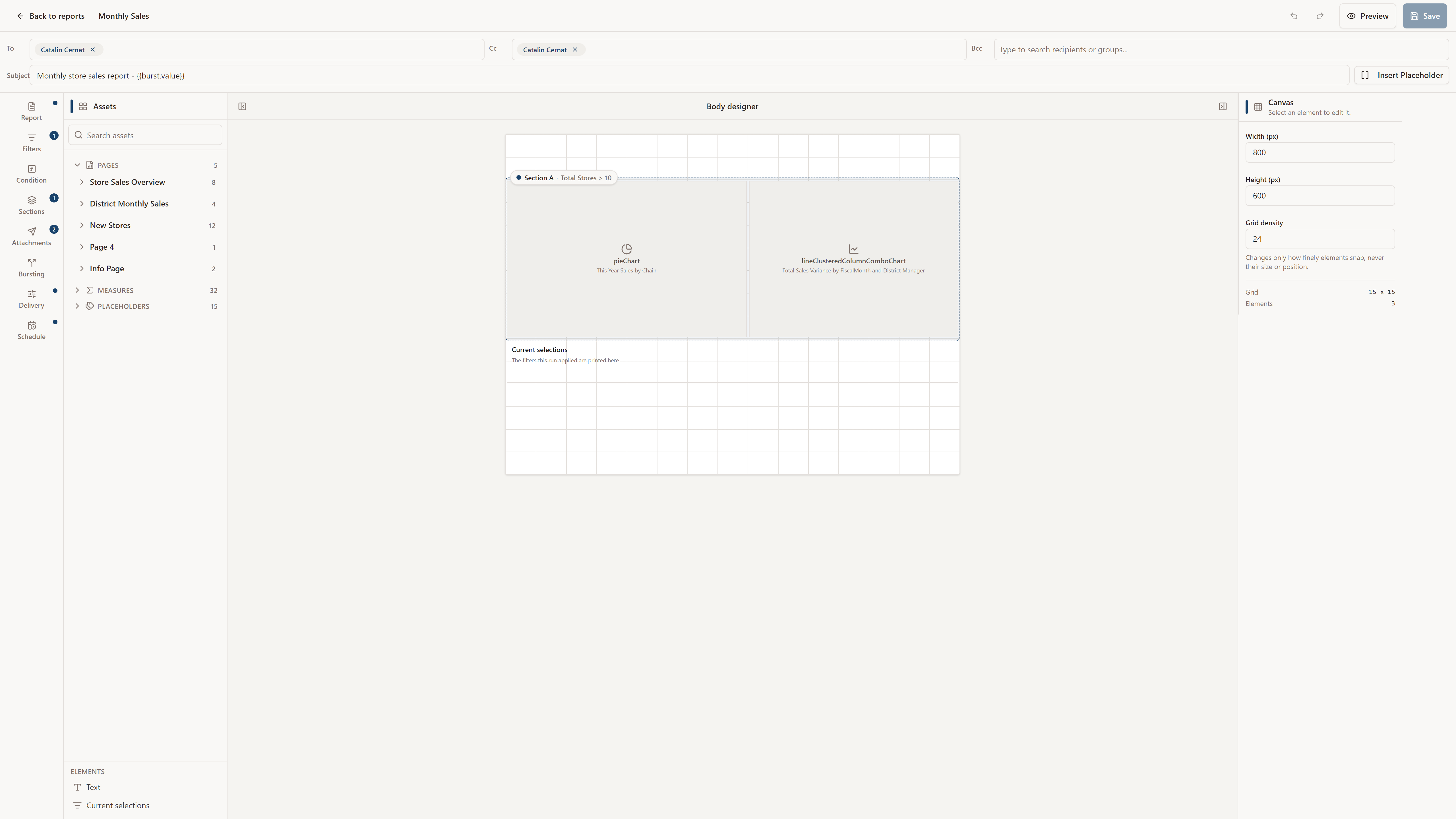
- Three-pane editor with drag-and-drop visuals
- Text with live measure tokens and seven email-safe fonts
- Conditional sections with measure comparisons or DAX
- Preview and run again
Personalise
- Bursting with a Count values check
- {{burst.value}} token in subjects and file names
- Discrete value, date preset and date range filters
- Optional recipient column per burst value
Attach
- Excel with up to 20 sheets, or one formatted table
- CSV
- PDF of the whole report or a single page
- PowerPoint, with dynamic file names
Deliver and monitor
- Cron schedules in the time zone you choose
- SMTP, SendGrid or Mailgun
- Dataset refresh and report execution alerts
- Execution history and users with roles

Go deeper
Feature guides
- BurstingOne filtered copy per region, store or customer, sent to the right person.
- Scheduling and triggersCron, Qlik task reloads and report chaining, with no stale sends.
- Send rules and conditionsMeasure-based gates for whole reports and single sections.
- AlertsReload and run alerts for Qlik, Qlik Cloud and Power BI.
- MonitoringStep-by-step execution logs, report health and run history.
Requirements
What you need to run it.
KPImailer is self-hosted. Full installation guides are in the documentation.
- Server
- Windows 10 or 11, or Windows Server 2016 and later
- Installs its own PostgreSQL, web server and Windows services
- Rolls back completely if installation fails
- Microsoft Entra
- An app registration
- Service principal access, or delegated user sign-in
- Power BI capacity
- Premium, Fabric or Embedded: native Export to file
- Pro or shared capacity: built-in high-fidelity render
- SMTP, SendGrid or Mailgun
FAQ
KPImailer for Power BI, answered.
Something else? Ask us directly. A product specialist, not a bot, answers within one business day.
Do recipients need a Power BI Pro licence?
No. KPImailer sends a finished email with attachments, so recipients do not need a Power BI licence, an account or access to the workspace.
Does it work without Premium capacity?
Yes. On Premium, Fabric or Embedded capacity KPImailer uses the native Export to file API. On Pro or shared capacity it falls back to its own high-fidelity browser render.
How does KPImailer connect to Power BI?
Through a Microsoft Entra app registration, either as a service principal or with delegated user sign-in.
How is this different from Power BI subscriptions?
KPImailer designs the email body itself, bursts one filtered copy per recipient, gates sending on DAX conditions and attaches Excel, CSV, PDF or PowerPoint. See the comparison page for details.
Send your first automated report this week.
Install the 30-day trial, connect your BI platform and design a report. If you get stuck, a product specialist will walk you through it.
No credit card. Every feature included. Nothing is deleted when the trial ends.